Load only what you open
Directories load on demand. Search covers loaded files without fetching an entire large repository first.
Local-first Chrome extension
Browse repositories with a fast, searchable sidebar while your code, credentials, and configuration stay under your control.
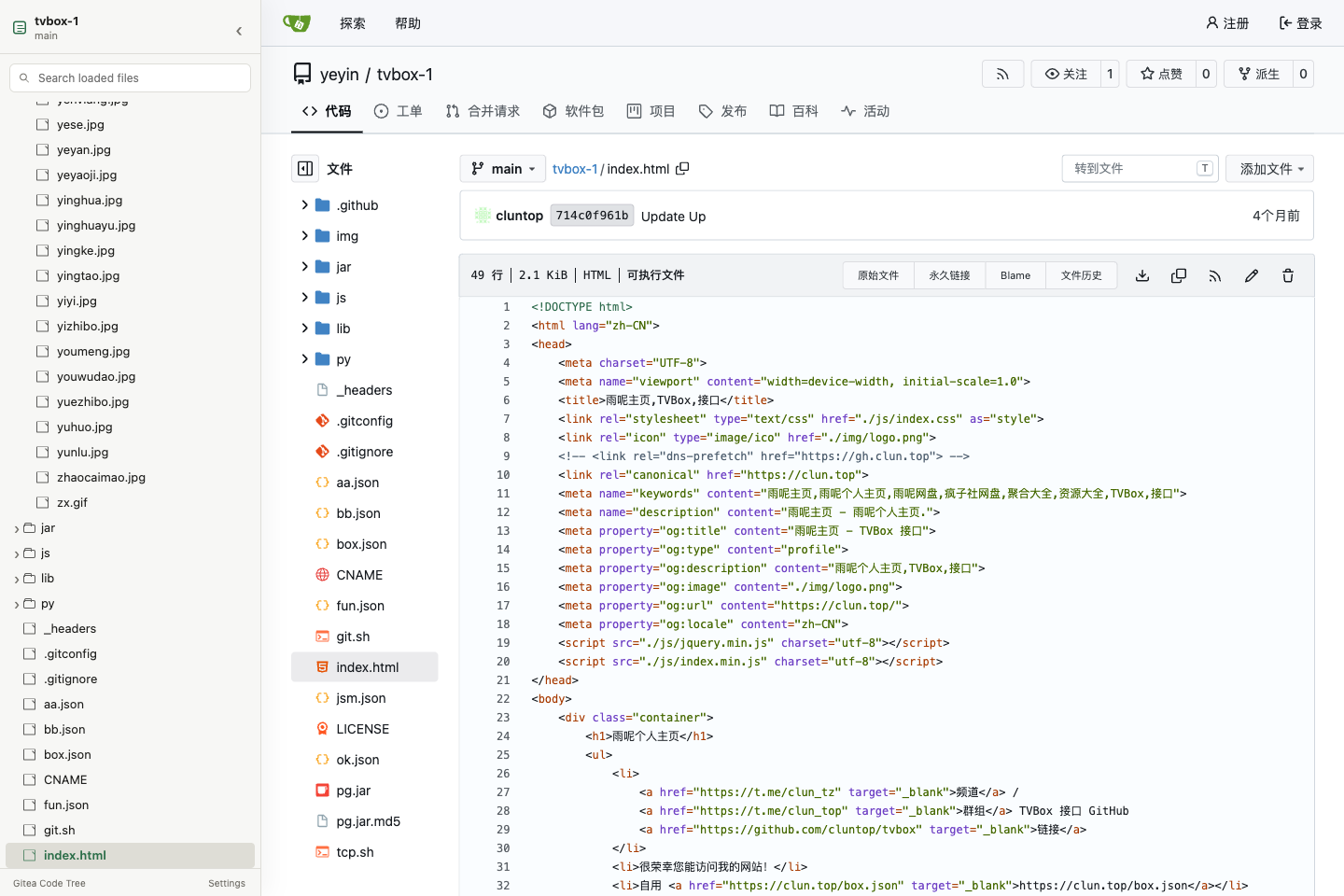
Five tested releases1.21, 1.22, 1.24, 1.26, 1.27
Private repositoriesSession or read-only token
Self-hosted readyPorts and subpaths supported
The tree follows the active route, expands the current path, and keeps Gitea's own page behavior intact.
Directories load on demand. Search covers loaded files without fetching an entire large repository first.
Branch changes, file navigation, and browser history update the active tree.
Resize or collapse the sidebar and let it follow Gitea's light or dark theme.
API-first loading is paired with an authenticated HTML fallback for versions and private-server configurations where API behavior differs.
No analytics, advertising, or developer-operated data service. Access is limited to Gitea instances you add and authorize.
See exactly what is storedRepository codeNot uploaded
Host accessRequested per instance
Optional tokenStored in Chrome locally
DiagnosticsExported only by you
npm ci && npm run build
Create the unpacked extension in the repository's dist/ directory.
Open chrome://extensions, enable Developer mode, and load dist/.
Add your exact Gitea URL in Options and approve access only for that instance.